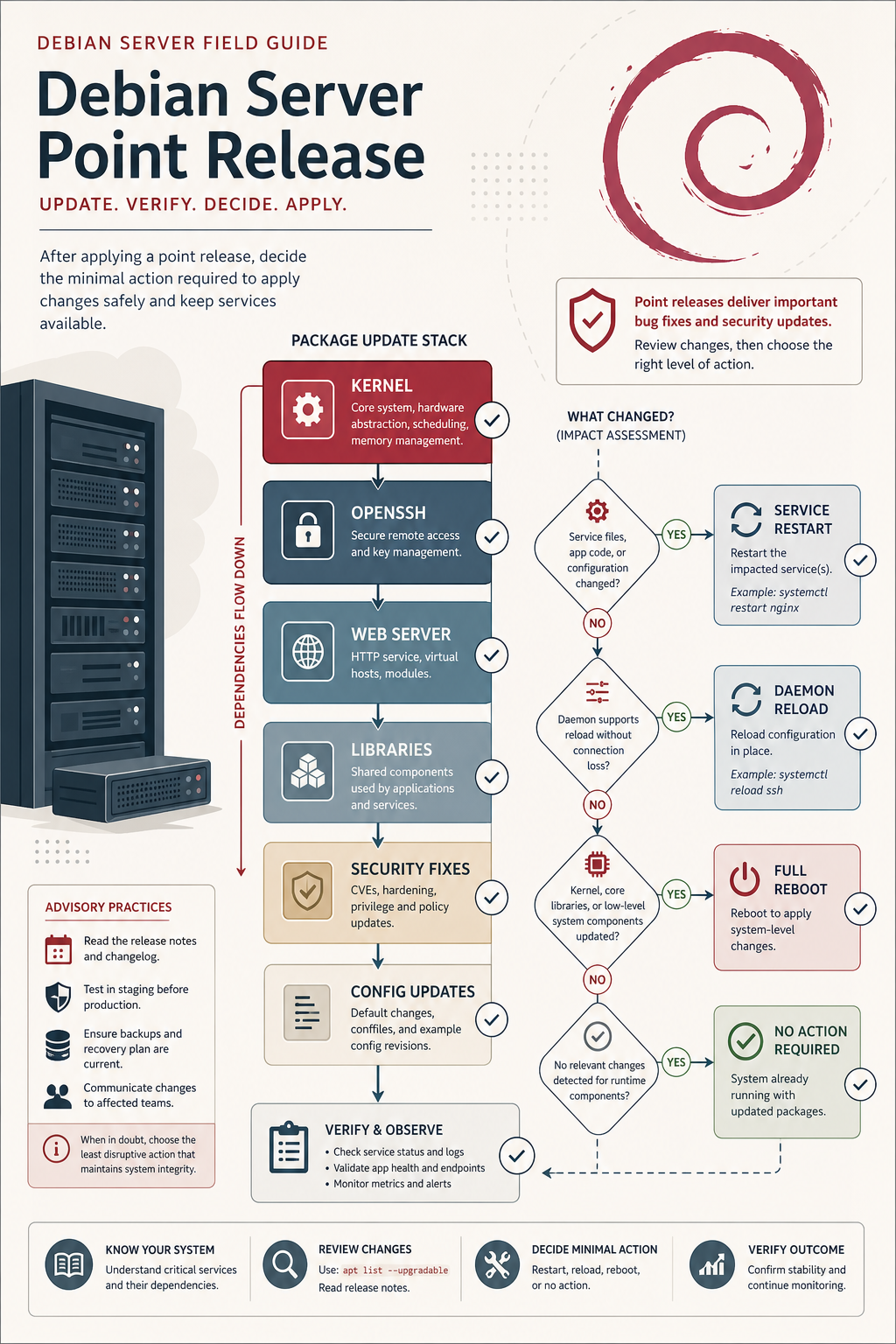
Debian 13.5 is a point-release rollup for Debian 13 “Trixie.” For server operators, it is not a reason to reinstall; it is a prompt to make sure security updates are applied, services are restarted, and any kernel or low-level library updates are handled cleanly.
The value of a point release is consolidation. It collects security and stability fixes so new installs start from a fresher baseline, while existing systems normally receive the same fixes through regular package updates.
What does a Debian point release mean?
A Debian point release updates installation media and rolls in fixes that have already moved through Debian’s stable update and security processes. Existing Debian systems do not need a fresh install just because 13.5 was released.
If your server has been updating regularly, much of the point-release content may already be installed. The task is to verify update health, not rebuild the server.
What stood out in Debian 13.5?
Debian’s 13.5 announcement lists many package fixes, including server-relevant components such as Apache, FreeRDP, kernel-related packages, desktop/X components, libraries, and application packages. Third-party coverage also highlighted security fixes across kernel and user-space packages.
Do not read the package list as “everything is urgent for every server.” Read it as a maintenance map: web servers, remote access components, libraries, and kernels deserve review first.
What should server operators review?
Use the release as a monthly maintenance checkpoint:
- pending security updates;
- services that need restart after library updates;
- kernel updates that require a reboot;
- web-facing packages such as Apache, PHP, reverse proxies, and app runtimes;
- remote-access packages such as OpenSSH;
- backup status before major service restarts.
If you run Ubuntu as well, the same pattern appears in unattended upgrades, Livepatch, and reboot windows. For Debian-specific context, link this with Debian 13 point releases for small server security.
Should you upgrade Debian 12 to Debian 13 because of this?
No. A Debian 13.5 point release is not by itself an upgrade mandate from Debian 12. Major-release upgrades deserve their own plan, backups, compatibility review, and recovery path.
If you are already on Debian 13, treat 13.5 as normal stable maintenance. If you are still on Debian 12, decide based on support windows, application compatibility, and your maintenance calendar.
Where point releases help most
Point releases help new server builds, disaster recovery, and operators who rebuild from installation media. Starting from 13.5 means fewer immediate updates after install and a cleaner baseline.
For existing hosts, the key is still routine patching. A server that ignores security updates for months is not made safe by reading a point-release announcement.
FAQ
Do I need to reinstall Debian for 13.5?
No. Existing Debian 13 systems should receive updates through normal package management.
Is Debian 13.5 only security fixes?
No. Point releases include security fixes and selected stability or correctness fixes.
Should I reboot after applying Debian 13.5 updates?
Reboot when the kernel or other reboot-sensitive components require it. Otherwise, restart affected services as appropriate.
Sources
- Debian News: Updated Debian 13: 13.5 released: https://www.debian.org/News/2026/20260516
- Phoronix Debian 13.5 coverage: https://www.phoronix.com/news/Debian-13.5-Released
- Debian Security Advisories: https://www.debian.org/security/