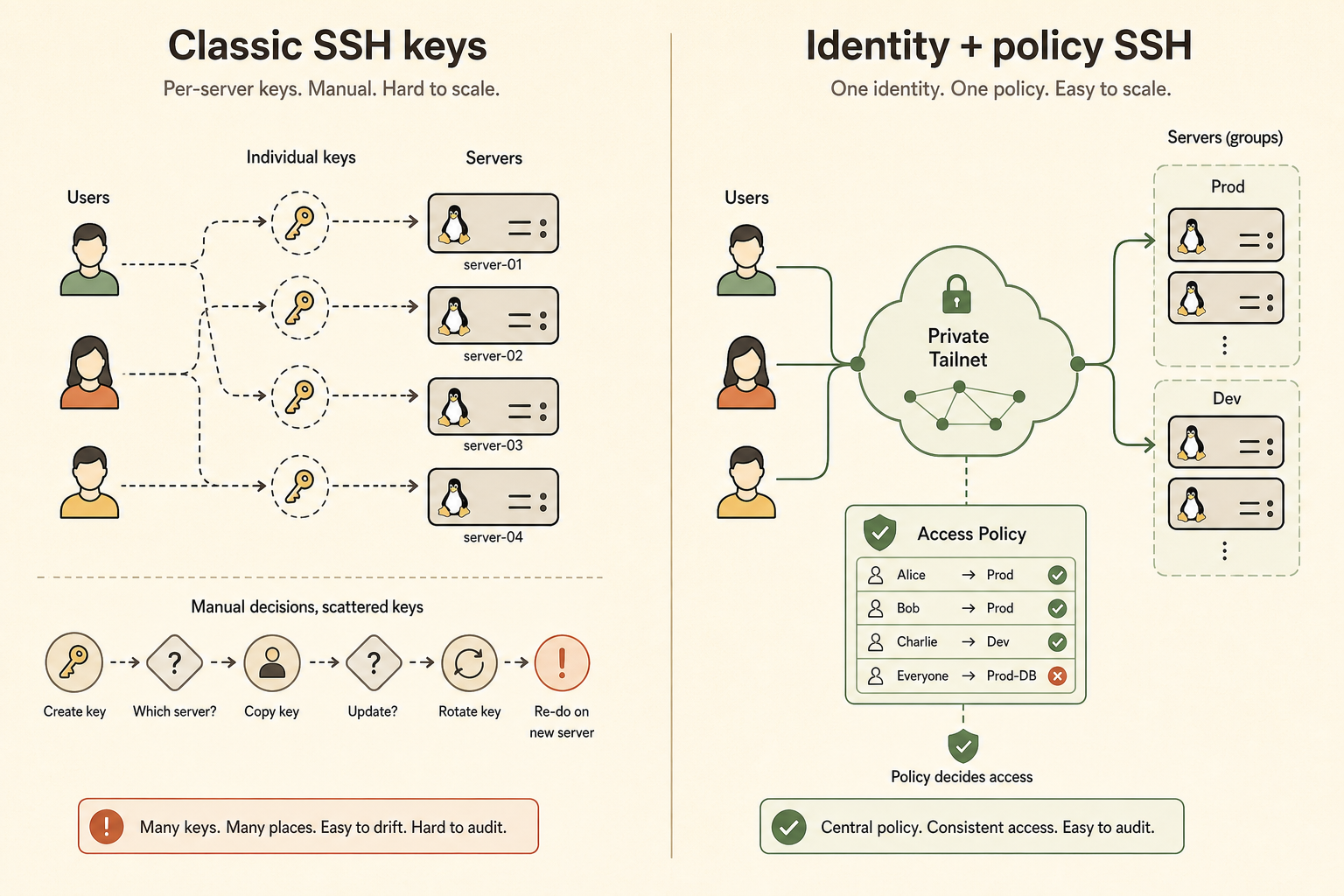
Tailscale SSH and classic SSH keys both get you into Linux servers, but they optimize for different operating models. Tailscale SSH centralizes authentication and authorization around tailnet identity and policy; classic SSH keys are portable, open, and independent of any mesh VPN provider.
For a small team, the best default is often: keep a hardened classic SSH recovery path, then use Tailscale SSH or SSH-over-Tailscale for daily private access if the trust model fits.
What is the real difference?
The difference is not “new SSH vs old SSH.” It is where identity and policy live.
| Question | Classic SSH keys | Tailscale SSH |
|---|---|---|
| Where is access granted? | Public keys in authorized_keys, SSH config, and server policy |
Tailnet identity and Tailscale access policy |
| What network path is expected? | Any reachable SSH path | Tailnet path to the node |
| What must be offboarded? | Keys on every relevant server | Tailnet user/group/device policy |
| What is the portability story? | Very high | Tied to Tailscale configuration |
| What is the recovery story? | Works without Tailscale if exposed/reachable | Depends on tailnet and Tailscale path |
Tailscale’s documentation says Tailscale SSH manages authentication and authorization of SSH connections in a tailnet and can reduce SSH key management by relying on Tailscale identity and access controls.
When is Tailscale SSH a good fit?
Tailscale SSH is a good fit when a small team already uses Tailscale, wants centralized access rules, and prefers to avoid distributing long-lived SSH public keys to every server.
It is especially useful when:
- servers should not expose public SSH;
- team membership changes often;
- access should be granted by group or role;
- high-risk logins should require re-authentication;
- the team wants a clearer offboarding process.
Tailscale also documents check mode and access-control integration. Those features are valuable because SSH access is not just connectivity; it is privileged operational authority.
When are classic SSH keys still better?
Classic SSH keys are still better when portability, simplicity, and vendor independence matter more than centralized identity. They also make a strong recovery path when your mesh network or identity provider is unavailable.
Use classic SSH keys when:
- you need access that works outside Tailscale;
- the server is managed by multiple parties with different tooling;
- you use SSH features such as restricted commands in
authorized_keys; - you want the fewest moving parts for emergency access;
- compliance or client rules require standard OpenSSH workflows.
Tailscale’s own docs note cases where Tailscale SSH may not be a good fit, including some multi-user machines and cases involving authorized_keys command restrictions.
What should a small team choose?
Choose based on access lifecycle, not tool preference. The best design is the one that lets you grant, review, and remove access without locking yourself out.
| Team situation | Better default |
|---|---|
| Solo operator, one VPS | Classic SSH keys plus optional Tailscale network access |
| Small team already using Tailscale | Tailscale SSH for daily access, classic SSH recovery path |
| Client-managed servers | Classic SSH keys unless client approves Tailscale |
| High turnover team | Tailscale SSH or SSH certificates with centralized offboarding |
| Offline or restricted environments | Classic SSH keys |
If you are still exposing SSH publicly, fix the network exposure first. Read the secure remote access hub and the small business server security review checklist before optimizing key management.
What about SSH over Tailscale without Tailscale SSH?
This is a valid middle ground. You can keep normal OpenSSH keys and configuration while using Tailscale only as the private network path.
That pattern gives you:
- no public SSH port;
- standard OpenSSH behavior;
- normal
authorized_keyscontrols; - less dependence on Tailscale SSH-specific policy;
- still some dependence on the tailnet for daily connectivity.
For cautious operators, this is often the easiest migration step: first make SSH private, then decide whether Tailscale SSH should replace static keys for daily logins.
Offboarding is the deciding test
The strongest practical question is: if someone leaves today, how do you remove their server access?
With classic SSH keys, you must know where their keys exist and remove them. With Tailscale SSH, you adjust tailnet policy and identity membership, but you must trust that policy path and keep emergency recovery separate.
If you cannot answer the offboarding question, the access system is not ready, regardless of which tool you picked.
FAQ
Does Tailscale SSH replace OpenSSH?
Not exactly. It changes how SSH authentication and authorization are handled for tailnet connections. Your standard SSH server and keys can still exist for other paths depending on configuration.
Is Tailscale SSH safer than SSH keys?
It can be safer operationally if it reduces key sprawl and improves offboarding. It is not automatically safer in every environment; the trust model changes.
Should I delete all SSH keys after enabling Tailscale SSH?
Not without a tested recovery plan. Keep a secure break-glass path until you have proven daily access, offboarding, and emergency recovery.
Sources
- Tailscale documentation: Tailscale SSH
- Tailscale documentation: access control
- OpenSSH manual pages and standard SSH key model