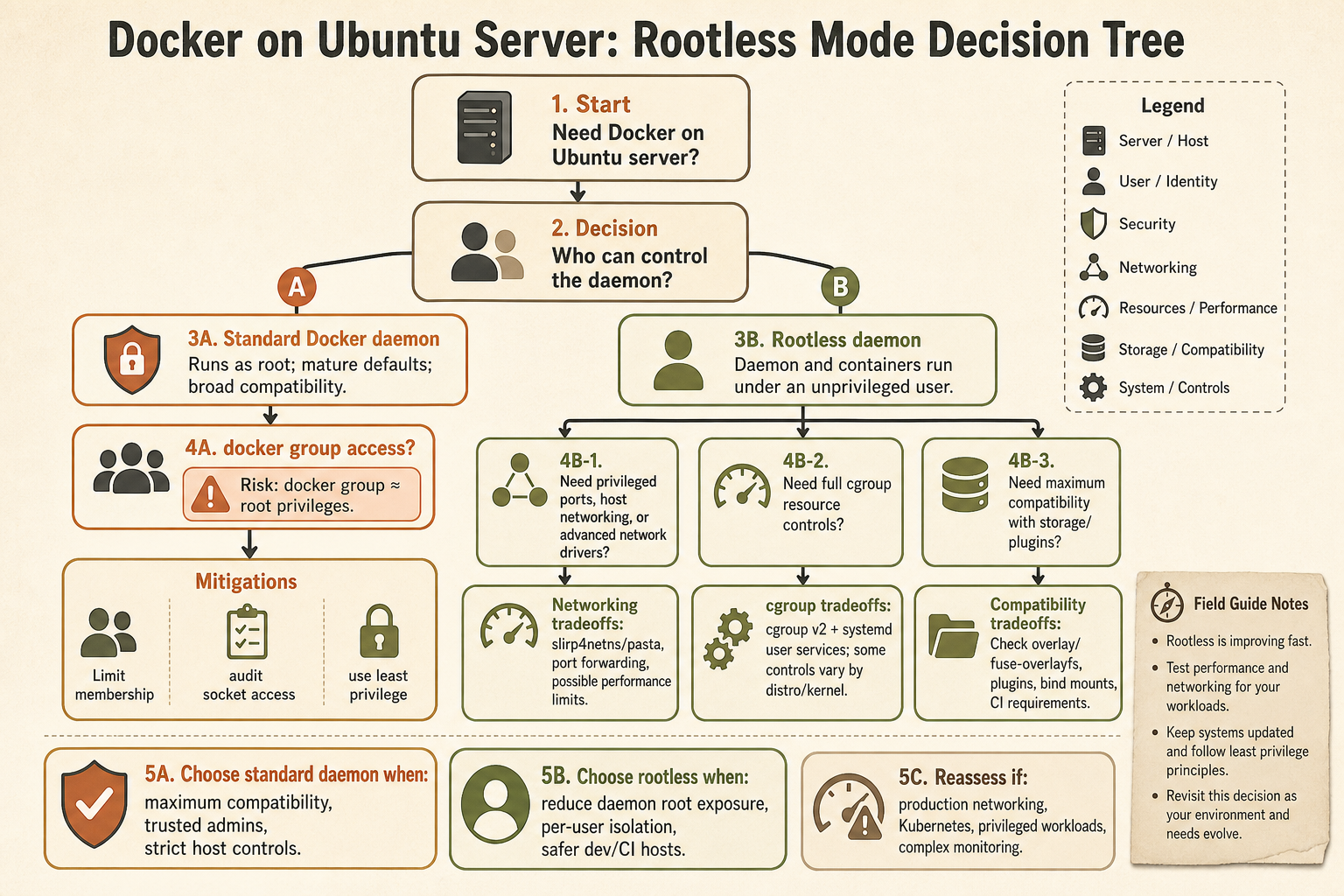
Docker rootless mode runs the Docker daemon and containers as a non-root user, which can reduce the impact of some daemon or runtime vulnerabilities. On Ubuntu 24.04, it is useful for specific risk models, but it is not a free hardening switch: networking, storage, cgroups, privileged ports, and troubleshooting all become different.
For many small VPS operators, the practical decision is not “rootless or insecure.” It is “rootless where the tradeoffs are worth it, standard Docker where simplicity matters, and no accidental public ports either way.”
What does rootless Docker actually change?
Rootless mode moves both the Docker daemon and containers into an unprivileged user context. Docker’s documentation describes it as running the daemon and containers as a non-root user to mitigate potential vulnerabilities in the daemon and container runtime.
That changes the blast-radius story. If something breaks out of the daemon path, it is not starting from the same host-root position as the normal Docker daemon model.
It does not mean containers are harmless. Containers still run code, expose services, mount data, consume resources, and can be misconfigured.
When does rootless mode help?
Rootless mode helps most when your main concern is reducing daemon-level root exposure for workloads that do not need the full behavior of standard Docker networking and privileged host integration.
Good candidates include:
- development containers on a shared Linux workstation;
- user-owned services that do not need privileged ports;
- isolated build or test workloads;
- small self-hosted apps with simple networking needs;
- environments where membership in the
dockergroup is considered too powerful.
The docker group point matters. On a normal Docker host, giving a user Docker control is often close to giving them root-equivalent power. Rootless mode can reduce that particular administrative risk.
When does rootless mode hurt?
Rootless mode hurts when you need the normal Docker behavior everyone assumes in tutorials. The tradeoffs usually show up around networking, cgroups, storage drivers, privileged ports, and troubleshooting.
Docker’s rootless troubleshooting documentation lists known limitations including storage-driver requirements, cgroup v2/systemd requirements for cgroup support, unsupported features such as AppArmor and overlay networks, privileged port handling, and source-IP limitations for port forwarding.
On Ubuntu 24.04 and later, Docker also documents restricted unprivileged user namespaces by default. If rootless extras are installed through the deb package, the needed AppArmor profile for rootlesskit is bundled; script-based installs may require extra AppArmor work.
Decision table for Ubuntu 24.04 servers
Choose rootless when it matches the workload, not because it sounds more secure. A simpler standard Docker setup with private bindings can be safer than a rootless setup the operator does not understand.
| Situation | Better default |
|---|---|
| One public web app behind a reverse proxy | Standard Docker can be fine if exposure is controlled |
| User-owned development workloads | Rootless Docker is worth considering |
| Need privileged low ports directly | Standard Docker or a fronting proxy may be simpler |
| Need overlay networking | Check rootless limitations first |
Strong concern about docker group risk |
Rootless Docker deserves a serious look |
| Small operator following common tutorials | Standard Docker plus strict port exposure may be more maintainable |
If the real problem is “my container exposed a private dashboard,” rootless mode is not the first fix. Start with binding and exposure review: why admin dashboards should bind to localhost, check listening ports with ss and lsof, and ss for Linux port audits.
Rootless does not fix public exposure
Rootless mode changes who the daemon runs as. It does not decide whether your app should listen on 0.0.0.0, whether a dashboard needs SSO, or whether a database port should be reachable from the Internet.
For self-hosters, most Docker incidents are not exotic container escapes. They are exposed admin panels, weak app credentials, forgotten ports, stale images, and unclear ownership.
Rootless mode can be one layer. It is not a substitute for a server exposure policy.
A practical starting recommendation
If you run a small Ubuntu 24.04 VPS and already have standard Docker working, do not migrate blindly. First inventory your published ports, reverse proxy, volumes, backups, users in the docker group, and services that would break under rootless limitations.
Then consider rootless for new workloads where:
- the app does not need privileged host integration;
- you can tolerate rootless networking differences;
- you have time to test deployment and recovery;
- the security gain is meaningful for your user model.
That is a better decision than treating rootless as a checkbox.
FAQ
Is rootless Docker more secure?
It can reduce daemon-level root risk, but it is not automatically safer for every workload. Misconfigured ports, weak app auth, and stale images still matter.
Does Docker rootless work on Ubuntu 24.04?
Docker documents Ubuntu 24.04-specific rootless considerations around restricted unprivileged user namespaces and AppArmor handling. Use current Docker docs before installing.
Should production servers use rootless Docker?
Sometimes. Use it when the workload fits the limitations and the operational team understands the differences. Do not migrate production just to satisfy a vague hardening goal.
Sources
- Docker Docs: Rootless mode
- Docker Docs: Rootless troubleshooting and Ubuntu 24.04 notes
- TheLinuxForum secure remote access and port-audit cluster