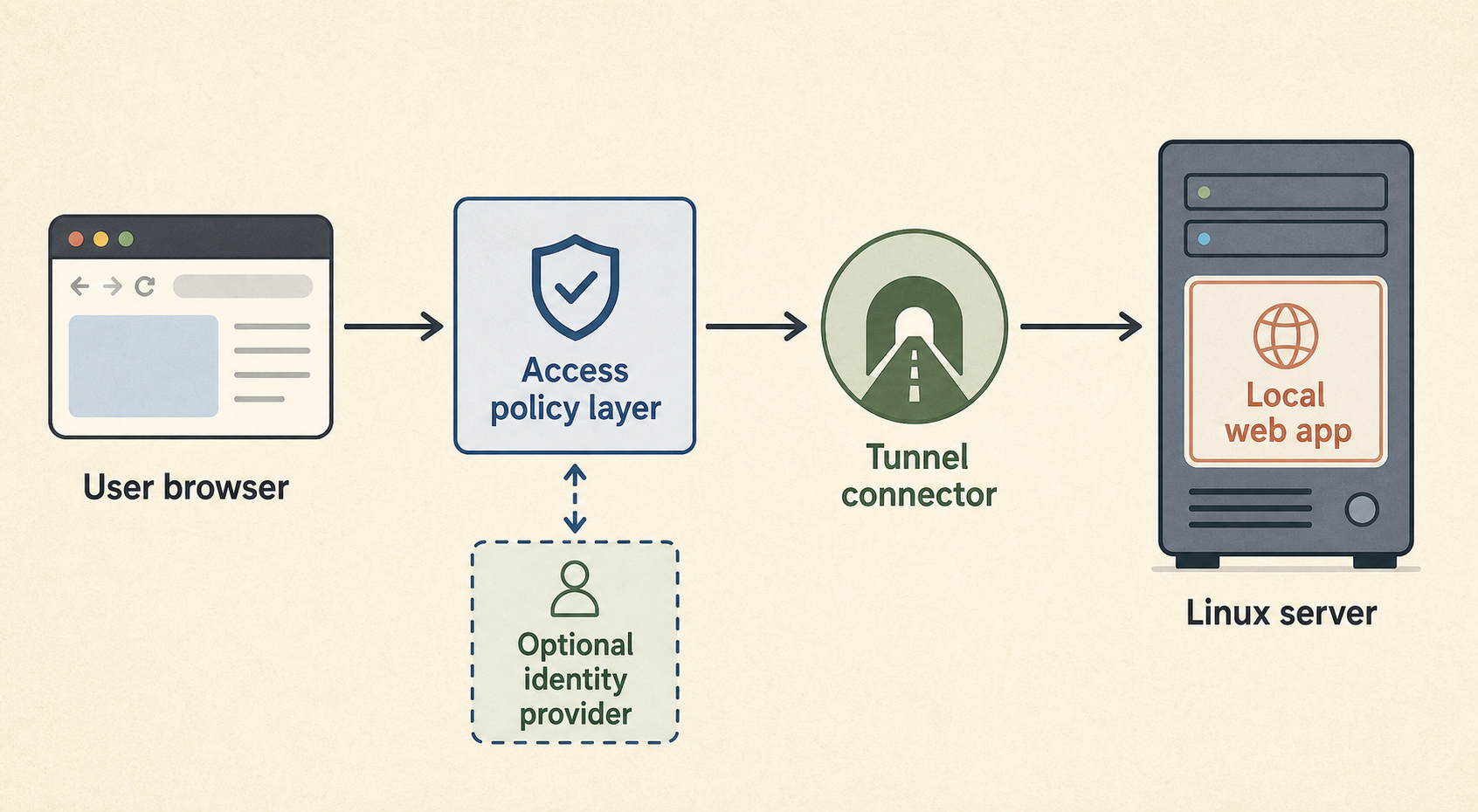
Cloudflare Tunnel, Cloudflare Access, and Authentik are often mentioned together, but they do different jobs. Tunnel gets traffic to a service without opening inbound origin ports, Access enforces who may reach a protected app, and Authentik can act as the identity provider behind a single sign-on flow.
If you remember one rule: a tunnel is transport, Access is policy enforcement, and Authentik is identity.
What does each component do?
Each tool sits in a different layer of the access path. Confusing those layers is how self-hosters end up with a hidden origin but still no real access control.
| Component | Main job | Best for | What it is not |
|---|---|---|---|
| Cloudflare Tunnel | Connect a public hostname to a private origin service through an outbound connector | Publishing HTTP apps without opening inbound ports | User authentication by itself |
| Cloudflare Access | Put identity-aware policy in front of an application | Browser-based admin tools, internal apps, client portals | A replacement for the app’s own authorization model |
| Authentik | Self-hosted identity provider and SSO platform | Central login, groups, MFA, OIDC/SAML identity flows | A tunnel or network path |
Cloudflare’s Access documentation describes publishing self-hosted apps by adding Access as an authentication layer between the user and the origin. That is different from merely routing traffic through a tunnel.
When is Cloudflare Tunnel enough?
Tunnel can be enough for a public web service that is meant to be reachable by anyone and already has an appropriate application security model. It is not enough for a private admin dashboard just because the origin port is no longer open.
Use Tunnel alone for things like:
- a public documentation site;
- a webhook receiver designed for Internet traffic;
- a small public web app with normal app-level auth;
- a temporary public preview where exposure is intentional.
For dashboards, control panels, staging systems, and internal tools, add an access layer or keep the app private through Tailscale, WireGuard, or SSH forwarding.
When should Cloudflare Access be added?
Add Cloudflare Access when the browser request should be denied before it reaches the app unless the user matches an identity policy. That is especially useful for self-hosted admin tools and internal apps with weak or uneven built-in login controls.
Access can enforce policy using identity providers and application sessions. In Cloudflare’s documented self-hosted app flow, users must match an allow policy before they are granted access.
Good Access candidates include:
- Grafana or monitoring dashboards;
- internal admin panels;
- staging apps;
- client portals with a limited audience;
- browser-based tools that should not be globally reachable.
Access does not remove the need to keep the underlying app patched. It reduces who can reach it in the first place.
Where does Authentik fit?
Authentik fits when you want to control identity yourself or centralize sign-in for multiple apps. It can act as an identity provider for systems that support OIDC, OAuth2, SAML, or proxy-style auth patterns.
In a Cloudflare-fronted design, Authentik may be the identity provider Cloudflare Access redirects users to. In a reverse-proxy design, Authentik may sit closer to your own infrastructure. Those are different architectures with different failure modes.
Choose Authentik when you actually want to operate an identity system. Do not add it just because a diagram looks more serious. Identity infrastructure becomes part of your critical path.
Which setup should a small self-hoster choose?
Choose the simplest layer that matches the risk. Public apps need clean publishing; private admin apps need private access or identity-aware gating; sensitive apps need both good app auth and limited reachability.
| Use case | Practical default |
|---|---|
| Public blog or docs | Normal HTTPS or Cloudflare Tunnel |
| Public app with user accounts | HTTPS/Tunnel plus strong app auth |
| Private dashboard for one operator | Tailscale, WireGuard, or SSH forwarding |
| Team dashboard in a browser | Cloudflare Access or private mesh access |
| Many apps needing SSO | Consider Authentik or another IdP |
| Client portal | Access/SSO plus app-level authorization |
This expands the same warning in Cloudflare Tunnel is not authentication and when a public web app needs Cloudflare Access.
Common mistakes
Hiding the origin and calling it private
A tunnel can remove direct inbound origin exposure. It does not decide who should be allowed to use the application.
Putting SSO in front of an app but ignoring app roles
SSO answers “who are you?” The app still needs to answer “what are you allowed to do?”
Making every dashboard public because Access exists
Some tools should remain private network-only. Identity-aware access is useful, but no public route is still the smaller attack surface.
Self-hosting identity without an outage plan
If Authentik is your login path, treat it like critical infrastructure. Back it up, monitor it, and know how you recover access.
FAQ
Is Cloudflare Tunnel authentication?
No. Tunnel is a connectivity path from Cloudflare to your origin. Sensitive apps still need authentication, authorization, or a separate access policy.
Is Cloudflare Access the same as Authentik?
No. Access is Cloudflare’s identity-aware access enforcement layer. Authentik is a self-hosted identity provider and SSO platform that can participate in login flows.
Should I use both Cloudflare Access and Authentik?
Use both only if you need Cloudflare’s edge enforcement and a self-managed identity provider. Many small setups can start with one simpler access model.
Sources
- Cloudflare One documentation: Tunnel and Access self-hosted applications
- Authentik official documentation
- Existing TheLinuxForum Cloudflare Tunnel and Cloudflare Access guides