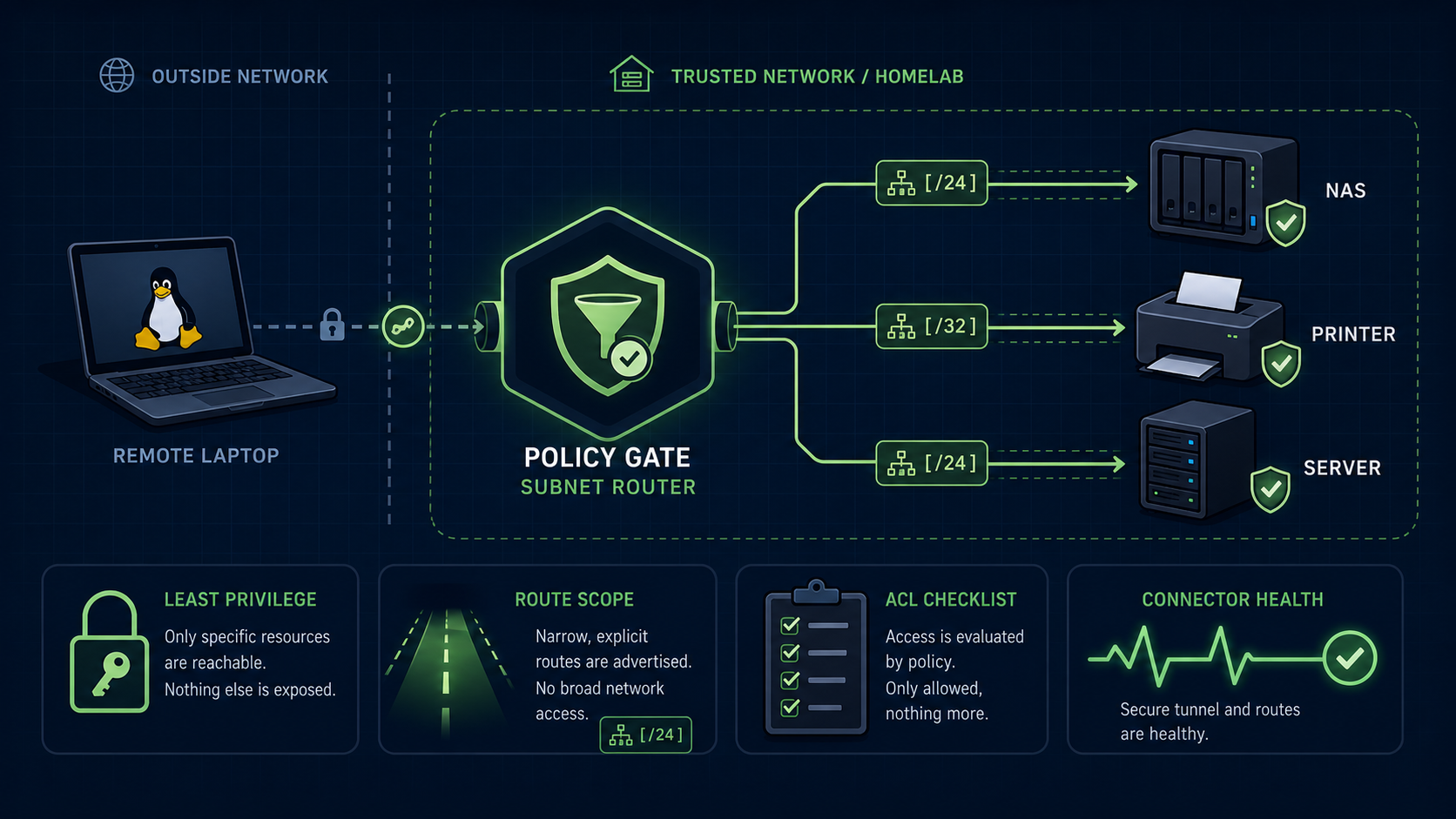
A Tailscale subnet router is powerful because it lets tailnet users reach devices that do not run Tailscale. That power is exactly why the first design should be narrow: advertise only the routes you need, restrict who can use them, and treat the router as production access infrastructure.
The safe default is simple: install Tailscale directly on servers where you can. Use a subnet router only for devices, LANs, or cloud subnets where direct installation is not practical.
What problem does a subnet router solve?
A subnet router bridges a tailnet to a conventional private subnet. Tailscale describes it as a gateway for devices that cannot or do not run the Tailscale client, such as printers, cameras, legacy appliances, cloud private networks, or managed services.
That is different from giving one Linux server remote SSH access. If the server can run Tailscale, direct node access is usually cleaner and easier to reason about.
Use a subnet router when the destination is behind the Tailscale node, not when the destination is the node itself.
The checklist before enabling routes
Start with access design, not the install command. The install command is easy; the hard part is deciding which private systems become reachable.
Before advertising a route, write down:
- the exact subnet or host range that needs access;
- which users, groups, or tagged devices should reach it;
- which ports are actually needed;
- whether the router is a convenience feature or production-critical;
- how you will know when routes stop working;
- how you will remove the route if the design was too broad.
If the answer is “the whole LAN, for everyone,” stop and narrow it.
Keep advertised routes as small as possible
A subnet router can make a whole private network reachable, but broad routing is not automatically good design. A /24 may include laptops, cameras, printers, NAS devices, development boxes, and forgotten appliances with very different risk profiles.
Prefer the smallest useful CIDR. If only one NAS or one internal service needs access, do not advertise the entire office network just because it is convenient.
The right question is not “can Tailscale route this?” It is “should every allowed tailnet client be able to attempt connections to everything inside this range?”
Use access policies, not tailnet membership alone
Tailscale access control policies are the layer that turns routing into an enforceable access model. Tailscale’s policy file supports grants and ACLs; current docs prefer grants for new policies, while ACLs continue to work.
For a small office, that means subnet access should map to real roles:
| Resource behind subnet router | Better access model |
|---|---|
| Office NAS | Admins and approved staff only |
| Printer | Staff devices, not contractors |
| Lab VLAN | Technical operators only |
| Production subnet | Admin group, narrow ports, tested policy |
| Cameras or IoT | Avoid broad remote access unless there is a strong reason |
A subnet route without a policy review is just a private network made easier to reach.
Watch device keys and connector health
A subnet router is a connector. If its key expires or the device goes offline, the advertised routes can become unreachable. Tailscale documents this as a fail-closed behavior for connectors: the route remains configured on clients, but traffic does not silently leak to another untrusted network.
That is the safer failure mode, but it can still break operations.
For production-critical routes:
- review key-expiry settings for the router device;
- document who owns the connector;
- consider high availability if the route is important;
- monitor reachability from at least one client;
- keep an emergency local access path that does not depend on the subnet router.
A private access path is only useful if someone notices when it stops working.
Be careful with source NAT changes
Tailscale subnet routers use source NAT by default. Tailscale’s docs note that disabling SNAT on Linux can preserve original source IP addresses, but doing so changes return-routing requirements.
For most small offices and homelabs, leave SNAT alone until you have a specific reason and a routing plan. Disabling it means the devices behind the subnet need a return route for Tailscale’s address range, commonly through the subnet router.
This is not a first-day hardening checkbox. It is a network-design change.
Do not mix routing roles casually
A subnet router is not the same as an exit node. A subnet router lets tailnet clients reach private networks; an exit node routes a client’s general internet traffic through another device.
If you are still choosing between the two, read Tailscale exit node vs subnet router before advertising routes. Combining roles can work in some designs, but it also makes failures and policy harder to reason about.
Small teams should keep the first deployment boring: one router, one narrow route, one clear access rule, one rollback note.
A practical small-office default
For a small office or homelab, use this default policy:
Install Tailscale directly on servers when possible. Use subnet routers only for devices or networks that cannot run Tailscale. Advertise the smallest useful route, restrict access by role, document the owner, and monitor the connector.
That default fits the broader secure remote access for small business servers model and the rule that only deliberate services should be public.
FAQ
Does a subnet router make my LAN public?
Not by itself. It makes approved private routes reachable to permitted tailnet clients, subject to your Tailscale configuration and access policies.
Should I advertise my whole LAN?
Usually not as the first design. Advertise the smallest useful route and widen later only if there is a clear reason.
Is a subnet router better than installing Tailscale on every server?
Not usually. Direct Tailscale installation on a server is often simpler and more precise. Subnet routers are for devices and networks where direct installation is not practical.
Sources
- Tailscale Docs: Subnet routers
- Tailscale Docs: Tailnet policy file syntax, grants, and ACLs
- Tailscale Docs: connector caveats, key expiry, and high availability concepts